Sell Fries Anomaly Help: Find and Close the Emergency Shutter
Find the red emergency button beside the service window using gameplay screenshots, and distinguish a visible shutter response from unverified anomaly advice.
Where is the emergency button?
Stand inside the kitchen and face the customer service window. The red button is mounted on the wall immediately to the window’s left. A yellow EMERGENCY sign sits above it. You do not need to open the shop menu or go outdoors to reach this control.
In Zac Worthy’s recording at 4:44, the game displays “Close the shutter!” and an arrow toward this area. The camera approaches the control and the interaction label reads “Closing” at about 4:49. The screenshot below makes the position easier to identify before you need it.
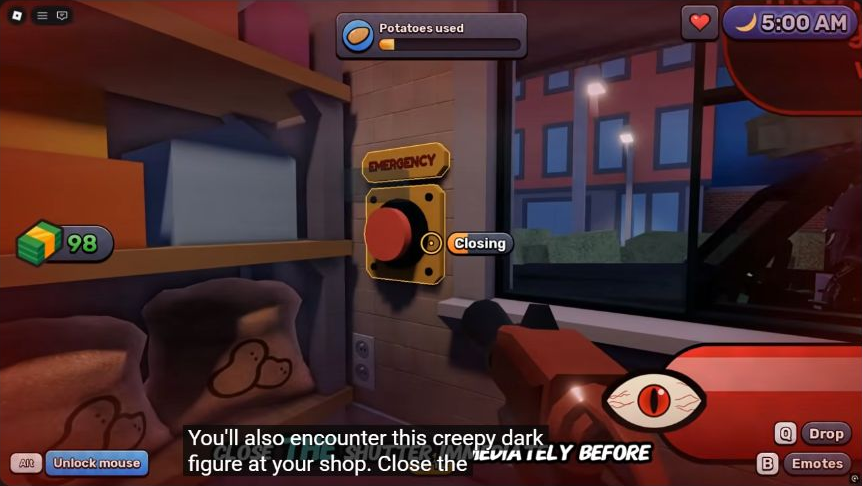
Gameplay excerpt: Zac Worthy, 4:49, published October 10, 2026. The game window, wall sign and button remain visible together.
What should you do when “Close the shutter!” appears?
- Leave the shop menu or other task and face the service window.
- Move close enough to the red EMERGENCY button for its interaction prompt to appear.
- Use the prompt currently shown on your device. The reviewed recording shows the label “Closing” during the interaction.
- Watch the shutter and the game’s warning rather than returning immediately to peeling.
The recording gives a clear control location and response, but it does not establish one safe delay for every encounter. Do not treat the time between edits as an allowed reaction window. Likewise, a countdown visible in one scene is not proof that all anomalies use the same timer.
The footage was recorded on desktop. We have not verified the mobile touch target, controller mapping, or whether an interrupted interaction requires another press. Follow your on-screen prompt instead of relying on a keyboard key copied from someone else’s device.
Is this a counter for every anomaly?
No. This guide addresses the explicit shutter warning in the reviewed clip. The creator describes a dark figure at the shop; other guides may give window threats different names. Matching the warning and the control is more reliable than assuming every label refers to an identical encounter.
| Situation | Evidence available here | Action supported by that evidence |
|---|---|---|
| “Close the shutter!” warning | Visible warning and directional arrow around 4:44–4:46 | Locate the window’s left-side emergency button |
| Button interaction | Visible “Closing” label at about 4:49 | Complete the current interaction and watch the shutter |
| Power outage | No directly reviewed recovery sequence yet | This page does not claim a verified breaker route |
| Giant, potato eater or cat encounter | No complete counter sequence reviewed for this page | Do not apply the shutter instructions automatically |
| Safe reopening time | Not measured | Use the game’s current state; no fixed delay is claimed |
That last distinction matters when choosing kitchen upgrades. A purchase described as “automatic” should not be assumed to replace every survival action. We have not run a controlled comparison of the fries shooter’s customer-serving behavior, defensive behavior, or ammo requirements.
How can you prepare without guessing a timer?
Before buying or collecting more potatoes, locate the emergency control from your normal working position. Keeping the window in mind reduces the time spent searching when the warning appears. In a group, agreeing who watches the window is a practical coordination suggestion, not a guarantee that the game assigns one player a defensive role.
Use the current warning as the trigger. Do not leave the building merely because another guide calls an encounter an outdoor monster. The golden-key walkthrough covers a separate outdoor task: reaching the basement hatch after obtaining the key. Its door is not the emergency shutter.
The recorded win and Hard Mode unlock show that a completed run can lead to another mode, but the win screen alone says nothing about that mode’s enemy schedule. Treat claims about fixed hard-mode spawn days as a separate question requiring its own footage.
See how the evidence is checked for the difference between a visible game prompt, a creator’s explanation and an unmeasured recommendation.

Zac Worthy — emergency shutter warning and button at 4:44–4:49
Related Articles
guides
Sell Fries Beginner Guide: First Order, Upgrades and Night Warnings
Learn the Sell Fries kitchen loop, choose a useful early upgrade, prepare for night warnings and find the right guide for your next objective.
guides
Sell Fries Classes: Regular Roll Odds, Roles and Gem Spending
Compare the seven reported Sell Fries classes, their regular roll chances and roles, with a practical approach to spending Gems.
guides
Sell Fries Halloween Event: Candy, Chest and Seasonal Rewards
Plan the Sell Fries Halloween event: collect Candy, find the seasonal chest, understand reported tools and keep night survival in view.
Was this helpful?
Thanks for the feedback!