Sell Fries Beginner Guide: First Order, Upgrades and Night Warnings
Learn the Sell Fries kitchen loop, choose a useful early upgrade, prepare for night warnings and find the right guide for your next objective.
What should you do in your first shift?
Start with a complete sale rather than a shopping list. The official Roblox description establishes the core loop of collecting potatoes, making fries, serving customers and upgrading the kitchen, with a warning about nightfall. The extra station detail below follows the Bloxron beginner walkthrough, checked October 19, 2026.
| Step | What to do | What to check before moving on |
|---|---|---|
| Collect | Take a potato from the outdoor pile | Your character is carrying the item |
| Peel | Work through the peeling stage | The potato is fully peeled |
| Cook | Place the prepared potato in the fryer | Cooking has completed |
| Collect fries | Pick up the finished food | You are holding the product to serve |
| Serve | Take it to the waiting customer | The order is accepted and the cash display changes |
Follow your device’s interaction prompt. Do not assume a keyboard shortcut from a desktop video is the touch control on mobile. If a station does not accept your item, identify which stage it is in before repeatedly interacting with another station.
How do you decide what to buy first?
After a few complete orders, watch where work piles up. Repeated carrying trips suggest looking at a carrying tool; a queue at the peeling station suggests a peeling upgrade. A money multiplier helps only when there is eligible income to multiply.
Our original kitchen-upgrade guide has photographed menu values and explains the difference between more carrying capacity and more profit. The recorded menu shows a $100 Bucket with a capacity of three and a $1,000 Vacuum with a capacity of eight. Those are source-video values, not a promise about a later patch.
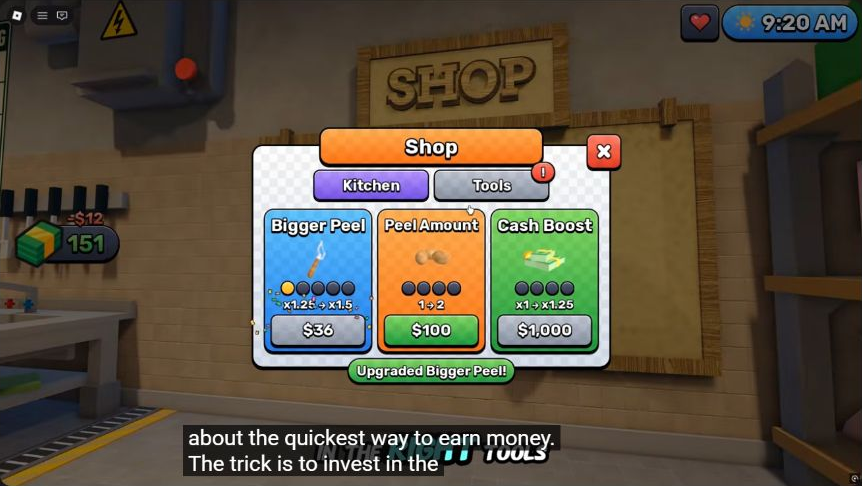
Source frame: Zac Worthy, approximately 0:39. Our detailed upgrade article explains which cards had already advanced a level.
What should you know before nightfall?
Find the emergency control while you are calm. In the reviewed footage, the red button sits immediately left of the service window inside the kitchen. When the game explicitly tells you to close the shutter, that is the control shown in the screenshot-backed shutter guide.
Do not turn that instruction into a counter for every threat. Read the current warning, keep track of your route back indoors and stop treating an interrupted order as your only priority. Our original survival article makes clear what the reviewed clip does and does not demonstrate.
Are Cash, Gems and Candy the same thing?
No: the guides on this site track them separately. Cash appears in ordinary kitchen purchasing; Gems appear on the recorded victory panel and in reported lobby class-roll costs; Candy belongs to the reported Halloween event. A code promising Candy is not evidence of a Cash boost or a free class roll.
Use class rolls and Gem spending for lobby decisions, codes for reported promotional rewards and Halloween activities for seasonal goals. Read the displayed currency on a price before spending.
What are you working toward after the first few orders?
The golden-key walkthrough follows the visible key objective to the outdoor basement hatch using credited gameplay frames. When your run reaches that stage, use the landmarks and current objective rather than assuming the key must arrive on a fixed day.
The win and Hard Mode page documents the completion screen and lobby instruction. Because the Halloween update adds a basement cutscene, the older recording should be used as a route reference rather than a guarantee of every scene in the current ending.
Related Articles
guides
Sell Fries Anomaly Help: Find and Close the Emergency Shutter
Find the red emergency button beside the service window using gameplay screenshots, and distinguish a visible shutter response from unverified anomaly advice.
guides
Sell Fries Classes: Regular Roll Odds, Roles and Gem Spending
Compare the seven reported Sell Fries classes, their regular roll chances and roles, with a practical approach to spending Gems.
guides
Sell Fries Halloween Event: Candy, Chest and Seasonal Rewards
Plan the Sell Fries Halloween event: collect Candy, find the seasonal chest, understand reported tools and keep night survival in view.
Was this helpful?
Thanks for the feedback!