Sell Fries Upgrades: Prices, Capacity and Cash Boost Payback
Compare on-screen Bucket, Vacuum and kitchen upgrade prices, with capacity gains and a clearly labeled Cash Boost break-even calculation.
Which upgrade numbers can you actually compare?
The table below transcribes the shop in Zac Worthy’s October 10, 2026 gameplay video, around 0:39–0:40. Prices belong to that recorded menu state. Check your own next-level card before buying: a price after one purchase is not a first-level price, and a later update may change the menu.
| Upgrade | Visible change or capacity | Displayed cash price | What it tells you |
|---|---|---|---|
| Bucket, before purchase | Carries 3 | $100 | Entry-level carrying capacity |
| Bucket, next level | Holds 3 → 4 | $40 | One extra potato per full trip |
| Vacuum | Sucks up 8 | $1,000 | Eight-potato capacity in this shop state |
| Peel Amount | 1 → 2 | $100 | The next menu level doubles the displayed amount |
| Bigger Peel, after an earlier purchase | x1.25 → x1.5 | $36 | A later level; do not quote $36 as the starting price |
| Cash Boost | x1 → x1.25 | $1,000 | A displayed 25% multiplier increase from the base level |
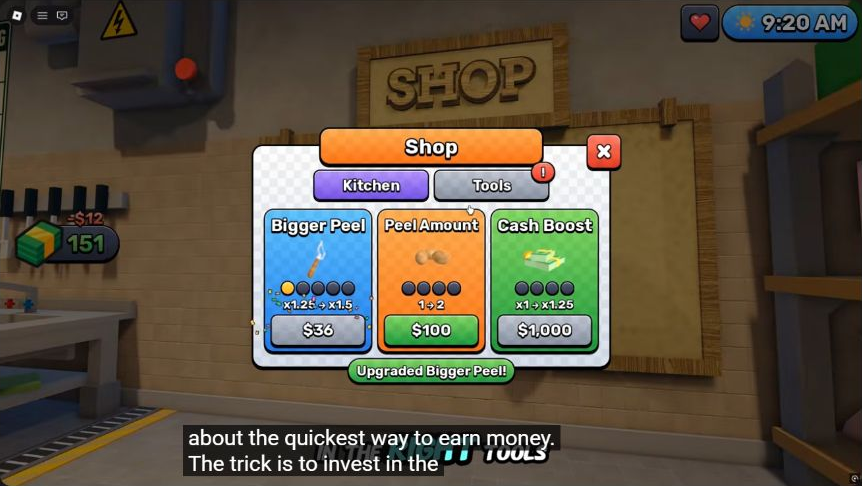
Menu evidence: Zac Worthy, 0:39. The “Upgraded Bigger Peel!” message is visible; that card has already advanced one level.
Does the Vacuum earn 2.67 times more money?
No such income result was measured. Eight divided by three is approximately 2.67 times the carrying capacity of the starting Bucket. It does not establish the same multiplier for earnings. Walking distance, collection speed, peeling, frying, serving and interruptions all affect the finished sales.
For a fixed target of 24 potatoes and completely full loads, the capacity arithmetic is eight trips with the 3-potato Bucket, six with the upgraded 4-potato Bucket, and three with the 8-potato Vacuum. This comparison ignores travel and collection time; it is a planning example, not a timed test.
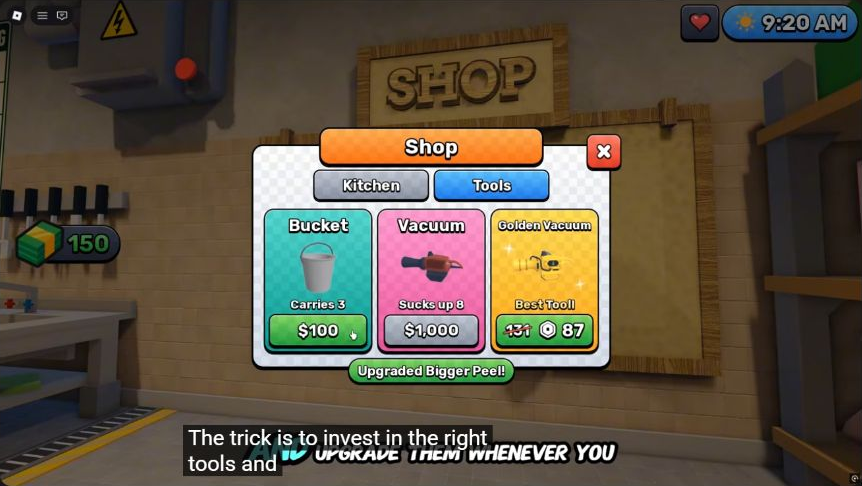
Capacity evidence: Zac Worthy, around 0:39. The separate Golden Vacuum premium offer is not used as a cash price or a permanent price claim.
When does the $1,000 Cash Boost pay for itself?
Under a constant-output model, after $4,000 of eligible pre-boost revenue. The additional multiplier is 0.25, so $1,000 ÷ 0.25 = $4,000. This assumes the displayed multiplier applies to all revenue in the comparison, with unchanged output and no other effects. The footage does not establish that every payment source qualifies.
| Hypothetical eligible income before buying | Added income at +25% | Modeled payback time |
|---|---|---|
| $100 per minute | $25 per minute | 40 minutes |
| $250 per minute | $62.50 per minute | 16 minutes |
| $500 per minute | $125 per minute | 8 minutes |
These three income rates are examples, not observed Sell Fries results. A player near the golden-key exit may have too little time left to recover the investment. A multiplier also cannot fix a production line that is regularly idle. Use the source and measurement notes before comparing claims of “fastest money.”
What should you buy next?
Choose the upgrade that addresses the task slowing your current kitchen. If repeated collection trips are the problem, compare the Bucket’s inexpensive next level against saving for the Vacuum. If potatoes are waiting at the peeler, the visible Peel Amount upgrade is relevant. If production and sales already flow steadily, Cash Boost is worth evaluating against how much of the run remains.
This is bottleneck-based advice, not a proven universal purchase order. The video is edited and changes several upgrades, so it cannot isolate cash per minute before and after each purchase. Exact return-on-investment rankings for the conveyor, fryer, robots and shooter remain unmeasured here.
Night interruptions also distort a short earnings sample. Keep the emergency shutter response available while planning upgrades. A final win results screen reports a whole run; it does not reveal which individual purchase earned its cost back.

Zac Worthy — Sell Fries beginner guide and recorded shop menus
Related Articles
guides
Sell Fries Anomaly Help: Find and Close the Emergency Shutter
Find the red emergency button beside the service window using gameplay screenshots, and distinguish a visible shutter response from unverified anomaly advice.
guides
Sell Fries Beginner Guide: First Order, Upgrades and Night Warnings
Learn the Sell Fries kitchen loop, choose a useful early upgrade, prepare for night warnings and find the right guide for your next objective.
guides
Sell Fries Classes: Regular Roll Odds, Roles and Gem Spending
Compare the seven reported Sell Fries classes, their regular roll chances and roles, with a practical approach to spending Gems.
Was this helpful?
Thanks for the feedback!